


[EXPERT ADVISOR MT5 v60.3]
Multi-currency trading robot for MetaTrader 5. Ten trading systems in one EA with the ability to work on multiple symbols from a single chart (currency pairs and gold). Intraday algorithmic trading with automatic risk management and capital protection.
Automatic lot calculation (risk-based or fixed), spread and slippage filters, news filter, and system filters.
The Expert Advisor does NOT use grids, martingale, averaging, locking, or other dangerous strategies. Does not use pending orders.
All trades are opened and closed during the trading day — no swaps, no gap risks.
Each trade is opened with a take profit and stop loss. Trades are also accompanied by a trailing stop.
-
Key Features:
- 10 trading systems to choose from (MOD1-MOD10)
- Multi-currency trading from a single chart
- Capital Protection (drawdown control + daily reset)
- Unified lot system (equalizes risk across different instruments)
- FIFO mode (strict position control: max 1 position per symbol)
- Automatic lot calculation with drawdown protection
- Built-in capital protection
- Trailing stop and order expiration
- R/W filters for improved signals
- Fully customizable position limits
1 -
Advantages:
- Safe trading (no martingale, no grids, no averaging, no locking)
- All trades are closed during the trading day
- Take profit, stop loss, and trailing stop for every trade
- Support for all popular currency pairs and gold
- Adaptation to different brokerage conditions
- Full logging and info panel
2 -
Requirements:
- Timeframe: M1 (required)
- Low spreads: up to 15/20 points on major pairs
- Leverage: 1:50 to 1:500
- Terminal: MetaTrader 5 (MT5)
- Stable internet connection (VPS Server)
GBPJPY,GBPUSD,AUDUSD,AUDCAD,EURCAD,
USDJPY,GBPCAD,USDCHF,USDCAD,XAUUSD3


💳 PURCHASE INFORMATION — WONNFX ULTRA MAX EA v60.3
🔒 PACK "LICENSE" (Account-linked license — .ex5)
Price: 700 USDT
Contents:
- WONNFX ULTRA MAX [EA MT5] v60.3 (Lic XXXXXXX) — compiled .ex5 file (5 copies)
- BASIC ADVISOR PAIRS AND SETS (TESTING, PAIRS, SETS)
- BASIC MOD SETS (TESTER)
- BASIC MOD SETS (MULTI-PAIRS)
- BASIC MOD SETS TESTER (MULTI-TESTING PAIRS)
- MYFXBOOK MONITORING CASES (TEMPLATES AND SETS)
- BEST EXPERT ADVISOR MODS ULTRA MAX
- WONNFX NEWS FILTER EA [MT5] — bonus
📖 PACK "OPEN SOURCE" (Full Source Code — .mq5)
Price: 7.500 USDT
Contents:
- WONNFX ULTRA MAX [EA MT5] v60.3 — full source code .mq5
- WONNFX NEWS FILTER EA [MT5] — full source code .mq5
- BASIC ADVISOR PAIRS AND SETS (TESTING, PAIRS, SETS)
- BASIC MOD SETS (TESTER)
- BASIC MOD SETS (MULTI-PAIRS)
- BASIC MOD SETS TESTER (MULTI-TESTING PAIRS)
- MYFXBOOK MONITORING CASES (TEMPLATES AND SETS)
- BEST EXPERT ADVISOR MODS ULTRA MAX
📋 HOW TO ORDER:
- Contact me via Telegram @wonndertrade or email wonndertrading@gmail.com
- Specify which pack you want (LICENSE or OPEN SOURCE)
- For LICENSE pack: provide your MT5 account number(s) — up to 5 accounts
- I prepare your personal copy and send payment details (USDT / TRC-20)
- After payment — you receive the full pack immediately

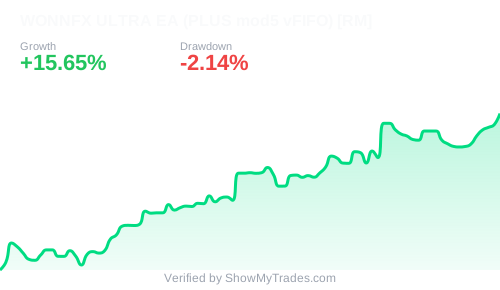

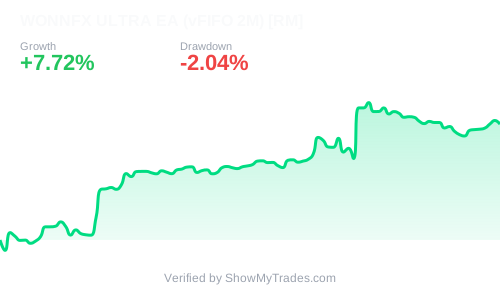
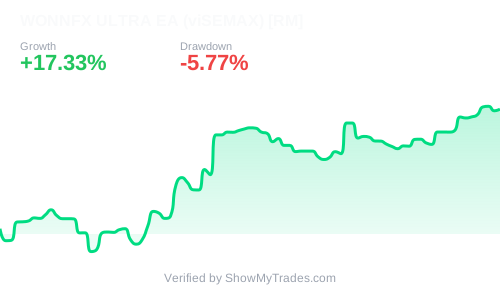
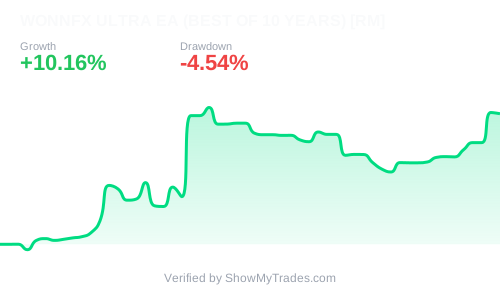
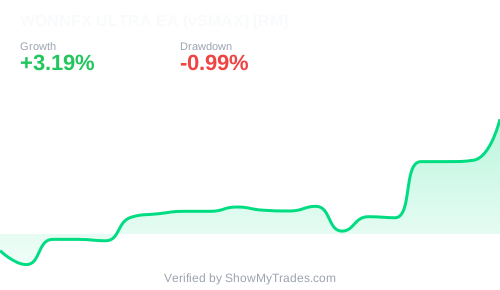
Multi-Symbol Expert Advisor for MT5. Trade multiple symbols from ONE chart. Timeframe: M1.
📊 MULTI-SYMBOL — TRADING SYMBOLS SETUP
- Symbols to trade — comma-separated list of symbols. Example: EURGBP,EURJPY,AUDJPY
- Symbol suffix — broker suffix (.r, .a, etc.). Usually leave empty.
- Auto-detect suffix — automatically detect suffix from the first symbol in the list.
⚙️ MOD SETTINGS — TRADING SYSTEM SELECTION
- MAX System select — select active system: mod1 ... mod10. Each system has unique entry logic.
- Period for all MODs — calculation period (V24/V48/V72/V96/V120).
- Signal method — reserved. Do not change.
- Trade Direction — Buy only / Sell only / Buy & Sell.
🔍 R / W FILTERS
- FilterR — enable/disable R filter.
- Rper — R filter period (V1 / V2).
- FilterW — enable/disable W filter.
- Wper — W filter period (V1 / V2).
🔄 REVERSE SIGNAL
- Reverse signals — swaps Buy ↔ Sell signals.
🎯 SINGLE POSITION MODE
- Single Position Mode — prevents opening a new position on a symbol if one is already open.
📏 POSITION LIMITS
- Max TOTAL positions — max positions across all symbols (0 = unlimited).
- Max positions per SYMBOL — max positions per instrument.
- Count ALL magics per symbol — count ALL magic numbers when checking limits (FIFO mode: 1 position per symbol).
⏱️ ORDER DELAY
- Delay between orders — pause between Order1 and Order2 (in seconds).
📈 TRADING SETTINGS — ORDER 1 & ORDER 2
🟢 Order 1 (always enabled)
- Auto lot — On = risk-based auto lot, Off = fixed lot.
- Risk Autolot — risk percentage from balance.
- Fix lot — fixed volume.
- Stop Loss / Take Profit — in points.
- Trailing stop, Trail start, Trail size — trailing stop settings.
🔵 Order 2 (optional)
- Order 2 — enable/disable second order.
- Same lot, SL, TP, trailing parameters as Order 1.
🔢 SIMPLE MAGIC NUMBERS
- Magic for Order 1 — default 11001.
- Magic for Order 2 — default 11002.
- Identical for all traded symbols.
⏳ ORDER EXPIRATION
- Use order expiration — enable auto-closing positions after N minutes.
- Expiration time — time in minutes until position is closed.
🛠️ OTHER SETTINGS
- Closing time of all trades — forced daily closing time (e.g., 23:45).
- Comment — order comment.
- Max Spread — maximum allowed spread in points.
🛡️ CAPITAL PROTECTION
- Enable capital protection — enable/disable drawdown protection.
- Max drawdown percentage — drawdown % from peak equity/balance. Trading stops and all positions are closed when reached.
- Reset protection daily — reset protection at 00:00.
⚖️ UNIFIED LOT SETTINGS
- Use unified lots for all pairs — equalizes lot size across different symbols based on point value.
- Protect lot from decreasing — locks the highest reached lot size (prevents reduction).
- Base pair for calculations — base pair for lot unification (recommended: EURUSD).
🚫 LOT SIZE LIMITS
- Max lot per symbol — maximum lot per instrument.
- Total max lot — maximum total lot across all open positions.
📺 INFOPANEL
- Info panel — display information panel on chart.
- Color, Font size, Font — panel appearance settings.
📥 INSTALLATION — WONNFX ULTRA MAX EA v60.3
After payment, you receive:
WONNFX ULTRA MAX EA v60.3.ex5— compiled EA (for licensed version)WONNFX ULTRA MAX EA v60.3.mq5— source code (only for "Open Code" tier)- Your account number is already embedded in the EA file — no separate license files required
1. Open MT5 → File → Open Data Folder
2. Navigate to
MQL5 → Experts3. Copy the received
.ex5 (or .mq5) file into this folder4. Restart MetaTrader 5 or right-click on "Expert Advisors" → "Refresh"
For licensed version (Account-linked license):
- No configuration needed. The EA is already tied to your account number.
- Simply drag the EA onto a chart — it will work immediately.
For "Open Code" version (Full Source Code):
- Open the
.mq5 file in MetaEditor.- If desired, disable license verification (parameter
inp_enable_protection).- Compile (F7) and use.
- Timeframe: M1 (required!)
- Choose ANY symbol from your trading list (e.g., EURUSD).
- In EA settings, specify the symbol list in the
Symbols to trade field.
1. Drag the EA onto the M1 chart
2. Enable Allow Algo Trading (the "AutoTrading" button in the toolbar)
3. Check the Experts tab in the Terminal — you should see "License check: PASSED" or "License: ACTIVE"
- The EA only works on M1. Do not change the timeframe after starting.
- If you see "License check: FAILED" after startup — you are using a version tied to a different account number. Purchase a license for your account.
- Requires low spreads (recommended up to 15 points on major pairs).
- Use ECN/RAW accounts for best execution.
- Version 60.3 includes Capital Protection — configure according to your risk tolerance.
- Start with a demo account or minimum lot size (0.01).
- For XAUUSD trading, ensure your broker allows 0.01 minimum volume.
- When using FIFO mode (
Count ALL magics per symbol = On), only 1 position per symbol can be opened.- Always set
Max positions per SYMBOL and Max TOTAL positions for risk control.
© WONNFX — Support on Telegram: @wonnfx
LICENSE AGREEMENT
WONNFX ULTRA MAX EA v60.3
© WONNDER (WONNFX)
Effective from May 1, 2026
1. Definitions
Licensee — an individual who purchases the right to use the Software.
Software — the WONNFX ULTRA MAX EA v60.3 Expert Advisor for MT5.
License — the right to use the Software under specified conditions.
2. License Types
2.1. "LICENSE" (Account-linked license — .ex5)" License
- Tied to a specific MT5 account number (up to 5 accounts per purchase).
- Source code is not provided.
- Licensee receives a compiled .ex5 file with the account number embedded.
- Validity: perpetual for the specified accounts.
2.2. "OPEN SOURCE" (Full Source Code — .mq5)" License
- Source code (.mq5) is provided.
- Licensee may modify the code for personal use.
- Redistribution of source code to third parties is prohibited.
- Sale or publication of modified versions is prohibited.
3. Payment Terms
Payment is made in USDT (TRC20) using the details provided after order confirmation. Prices are published on the website wonnfx.online.
4. Rights and Obligations
Licensee has the right to:
- Use the Software for personal trading on live and demo accounts.
- Install the Software on an unlimited number of MT5 terminals under their licensed account numbers.
- For "Open Code" version — modify the code for personal needs.
Licensee does NOT have the right to:
- Decompile or disassemble the Software (for .ex5).
- Transfer, sell, rent, or publish the Software or its parts.
- Remove or bypass license protection mechanisms.
- Present the Software as their own work.
5. Disclaimer of Warranties
The Software is provided "AS IS". The Licensor does not guarantee profitability. The Software is a tool, and all trading decisions are made by the Licensee at their own risk. The Licensor shall not be liable for any financial losses resulting from the use of the Software.
6. Activation Procedure
6.1. Before making a payment, the Licensee must send their MT5 account number(s) (up to 5 accounts for the LICENSE pack) to the Licensor via Telegram @wonndertrade or email wonndertrading@gmail.com.
6.2. Upon receiving the account number(s), the Licensor prepares the personal compiled .ex5 file with the account number(s) embedded and confirms to the Licensee that the license files are ready.
6.3. After confirmation, the Licensor provides the USDT (TRC-20) wallet address for payment.
6.4. The Licensee makes the payment in full. Immediately upon confirmation of the transaction, the Licensor sends the complete package (EA file, settings packs, monitoring templates, and bonus materials).
6.5. For the "OPEN SOURCE" version, the same procedure applies. The Licensor sends an archive with the full source code (.mq5) after payment confirmation.
6.6. No separate license key or activation file is required — the account number is already embedded in the compiled .ex5 file.
7. Refund Policy
Digital products are non-refundable. Due to the nature of digital goods (software source code and compiled files), no refunds will be issued after the files have been sent to the Licensee or after the license has been activated. By completing the purchase, the Licensee confirms their understanding and acceptance of this policy.
8. Support
Free technical support is provided for 30 days from the purchase date via Telegram: @wonnfx. Ongoing support is available by arrangement.
By placing an order and making a payment, the Licensee confirms full acceptance of the terms of this Agreement.
USDT payment details will be provided after order confirmation on the website.
WONNFX ULTRA MAX EA vs 90% of Robots on the Market
| Risk | 90% of market robots | WONNFX ULTRA MAX EA |
|---|---|---|
| Method | Martingale, grid, averaging, locking | Fixed trades only: SL, TP, trailing stop |
| Overnight gap | Yes (positions held overnight) | No (all closed by end of day) |
| Account blow-up | 100% loss risk in a single trade | Eliminated (drawdown control) |
| Risk management | Chaotic lot increase | Unified lot calculation from balance |
| Transparency | Monitoring often absent | Public Myfxbook + 10-year video tests |
Who This Expert Advisor Is For
For Traders
Automate your manual strategy and remove emotion. The EA handles entry signals, stop-loss and take-profit placement. No martingale, grids, or averaging.
For Hedge Funds
A ready-made solution with 10 years of backtest history. Multi-currency trading, public track record, strict drawdown control. Full support at every stage — from installation to launch.
For Prop Firms
Fits perfectly within your company rules: intraday trading only (no swaps), fixed stops and targets, built-in drawdown protection. License covers 5 accounts.
For Investors
Passive income without diving into trading. Transparent Myfxbook statistics, daily result fixation. Your capital works — it doesn't gamble "until the first blow-up".
Multi-Symbol for MT5
One chart – multiple instruments.
Exclusive MOD technology.
It is also important to understand and realize that the EA does not use dangerous trading methods (martingale, grid, averaging, locking). For this reason, there may be losing trading periods, and that is normal. The EA works with fixed positions over a specific period, eliminating the risk of losing the entire deposit.
Why is this important to understand?
In EAs that use martingale, grid, averaging, locking, and other dangerous methods (and such EAs account for more than 90% of trading robots on the market), the entire deposit can be involved in a single trade. This creates a huge risk of losing everything in one trade (which often happens with such EAs).
In the WONNFX ULTRA MAX EA this is excluded. Only fixed trades using:
- stop-loss
- take-profit
- trailing stop
- time-based closing
- auto lot
- additional filters
2) Why sell licenses and open source if the EA is so good?
The reason is simple: capital / deposit is needed for the project's systems, as well as funds for further development. There is no goal to sell many licenses — only a limited number, to raise capital for the project's systems.
Sales terms:
- First 3 licenses are sold at 3,300 USDT
- After 3 licenses are sold, the price increases to 5,500 USDT
- The price for Open Source (Full Source Code) will also increase after the first 3 licenses are sold
- Click "Order" on the product page or contact me via Telegram @wonndertrade.
- Choose your package: LICENSE (compiled .ex5 for up to 5 accounts) or OPEN SOURCE (Full Source Code .mq5).
- For the LICENSE package, provide your MT5 account number(s).
- You will receive payment details in USDT (TRC-20 network).
- After payment confirmation, you immediately receive the files, settings packs, and support.
- Important: Digital products are non-refundable after files are sent or the license is activated.
- EA file (.ex5 or .mq5)
- Basic optimization settings packs (Basic MOD Sets)
- Multi-pair testing sets
- Myfxbook monitoring templates
- Bonus: WONNFX NEWS FILTER EA (news filter) — also in the corresponding format (.ex5 or .mq5)
To verify performance:
- Real monitoring (myfxbook): Live statistics are constantly updated on the website.
- Video testing: The product page includes test results and optimization videos.
- Copy Trading: You can subscribe to signals and trade without purchasing the EA.
- Individual testing: Upon request via Telegram, you can discuss the possibility of personalized testing. Additional information is provided upon personal request.
- LICENSE (Account‑linked license): You receive a compiled .ex5 file tied to your account number (up to 5 accounts per purchase). The source code is closed. The file will not run on a different account number.
- OPEN SOURCE (Full Source Code): You receive the complete .mq5 source code. You can study, compile, and modify it for personal use, but you may not redistribute it.